





Freight railroad service design requires planners to coordinate traffic, trains, blocks, and assets across the network. Oliver Wyman’s MultiRail Web is used by leading railroads as their core software platform for rail service design planning. It provides a layered toolset for railroad planners to comprehensively manage these elements.

As an integrated solution providing end-to-end support for the planning and steering process, MultiRail Web enables railroads to optimize operations and costs. Teams can manage service design processes and analytics using historical or forecast traffic data. Its robust, multi-user collaborative interface provides diagnostic levers for efficient traffic routing and handling, along with tools that help eliminate errors and loose ends in the operating plan.

Optimize your operations and lower costs with greater control

MultiRail Web provides a structured, collaborative planning process that helps teams build cohesive plans, test alternatives, improve service and asset productivity, and understand customer impacts before changes move downstream.

Structure
For New Plan Generation

Rapidly develop what-if scenarios with alternative plan ideas through a faster, structured analytical process and improvement-suggestion tools

Liberate
the Design Process

Reduce unstructured, ad hoc analysis in Microsoft Excel and Access, saving time during data extraction and analytical steps

Stabilize
the Plan

Create a more cohesive, reliable, and tested plan that requires fewer downstream modifications and minimizes network stress caused by a lack of structure

cross
Internal Boundaries

Use a structured framework that crosses the railroad’s geographic and organizational boundaries, helping teams collaborate on the best plan for the railroad

Improve
Service Metrics

Improve key measures that drive service reliability and asset productivity, including terminal dwell times and train sizes

Simulate the
Customer Experience

Understand how prospective changes affect origin-to-destination trip plans, with an audit process that tracks changes over time

Railroad service design in six steps

Combine core data and plan development inputs, then simulate trip plans to assess customer, service, asset, and capacity impacts

Core data

Plan development and analysis

Results

Network
Network structure, including links and nodes, and relevant attributes such as speeds
Traffic
Detailed or forecast unit data, including client, service type, and commodity
Yard Blocks
Optimization of criteria groups as a basis for routing plans and yard plans
Trains
Train schedules, train blocks, train capacities, and more
Trip Plans
Simulation of car movements through the network
ANALYTICS
Train and yard workloads against capacity, cost, and resource estimates

Recoup the cost
in 6-12 months

MultiRail Web allows railroads to capture the value of operational improvement through a structured planning process, with opportunities across service, capacity, asset productivity, and cost.

6
Steps from core data to trip plan simulation
6
Areas for operational improvement
6–12
Months to recoup the cost
Train Speed

Consolidate work, crew, fuel, inspection, DPU, helper, and other train events, while making sure trains operate within capacity limitations

YARD THROUGHPUT

Plan yard workload and activity types by shift and day of the week, within capacity limitations

Car Velocity

Improve car connections in yards, explore new block builds that reduce downstream handlings, and make sure areas of dwell and excessive work are reduced

local operations

Build local service plans to model local train operations, confirm serving-yard capacity is adequate for local needs, and track customer switching and/or blocking commitments

Corridor THROUGHPUT

Manage the interfaces between corridors and yards, and make sure corridors have sufficient capacity for nonscheduled train slots and maintenance events

PRODUCTIVITY AND COSTS

Evaluate and contrast plan scenarios by exploring simulation results with capacity awareness, operational metrics, and resource and cost estimates

Build a more cohesive, reliable, and tested railroad operating plan

MultiRail Web
enables structure and savings

MultiRail Web’s flexible design structure allows a next-day, next-month, next-quarter, or next-year modeling approach. Its modern interface gives railroad planners the tools to build sustainable, resource-appropriate, and capacity-aware plans.

The following sections should remain as image-and-text modules so the original detail can be retained rather than compressed into short feature boxes.

DASHBOARD FOR A NEW GENERATION OF USERS AND PROJECT INSIGHTS
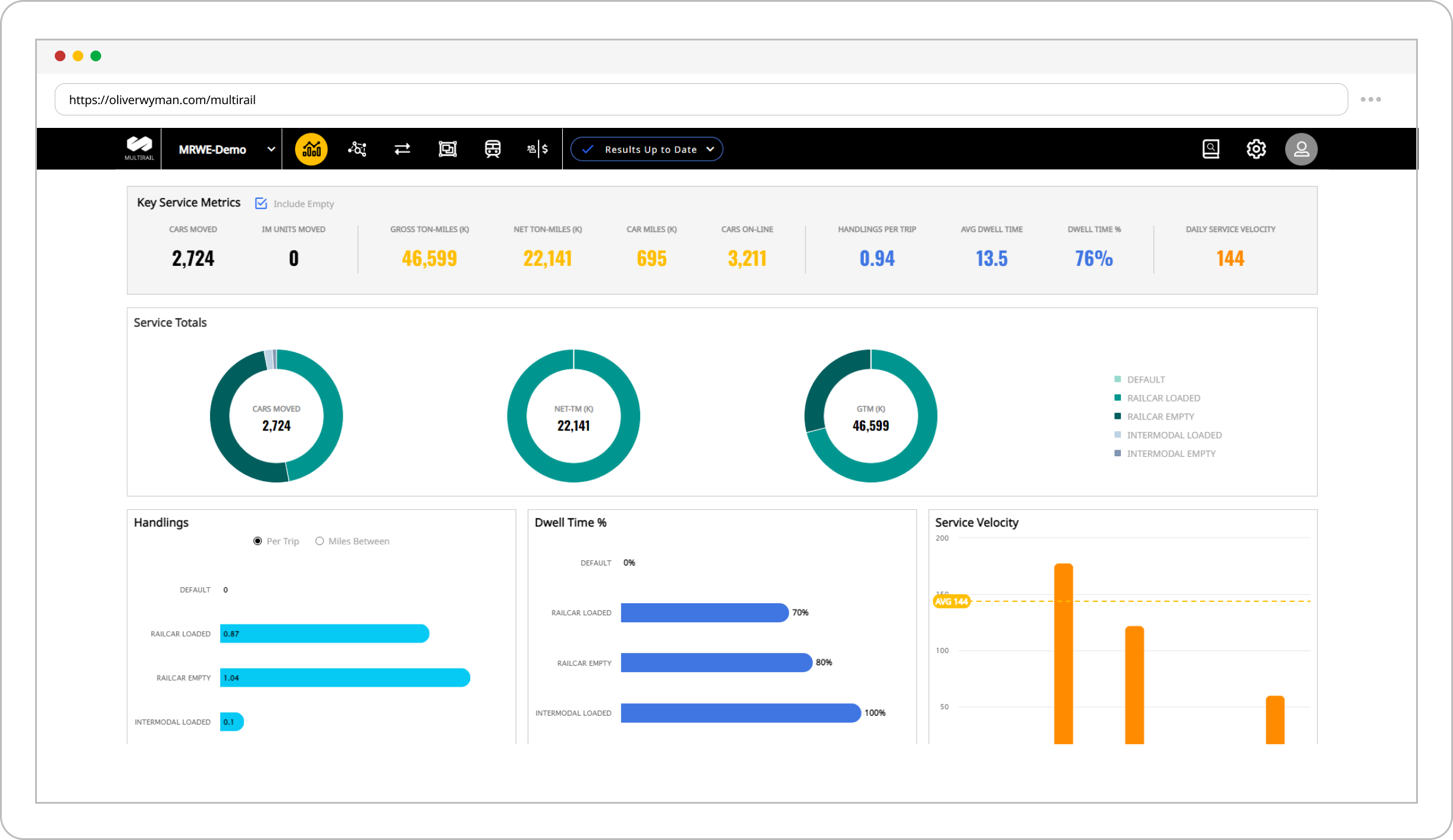
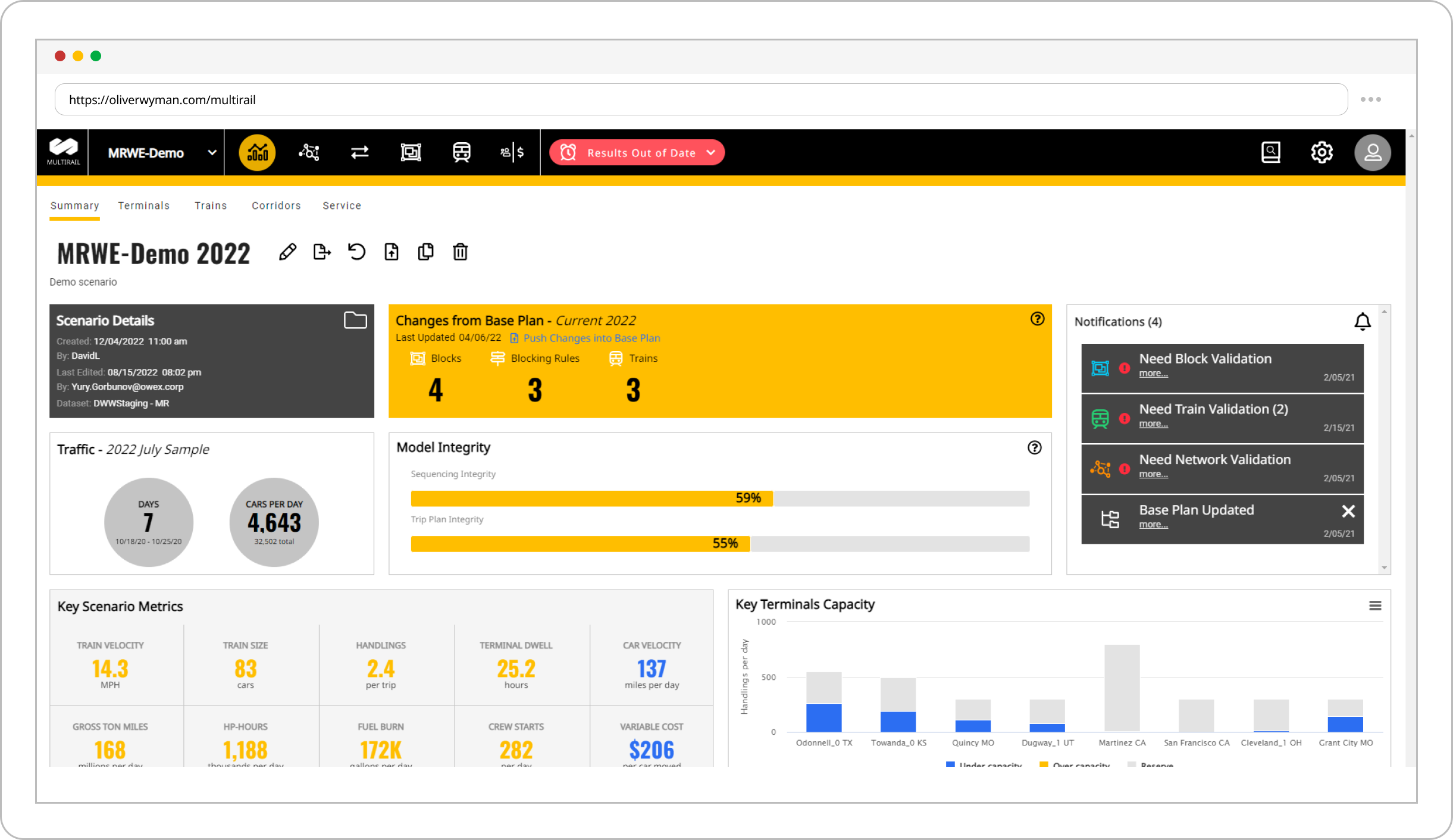
MultiRail Web’s dashboard layer helps users understand the structure and status of their plan. Navigational aids allow users to move quickly between plan adjustments and analytics while staying updated on calculation status, data discrepancies, and items requiring validation. Key plan metrics for each scenario are available at a glance.
MultiRail Web supports multiple base plans and change scenarios. It also supports network changes, allowing users to model what-if changes to the railroad’s physical plant. Comparative tools help users evaluate the differences between two plans simultaneously.
ADVANCED BLOCKING PLAN MANAGEMENT
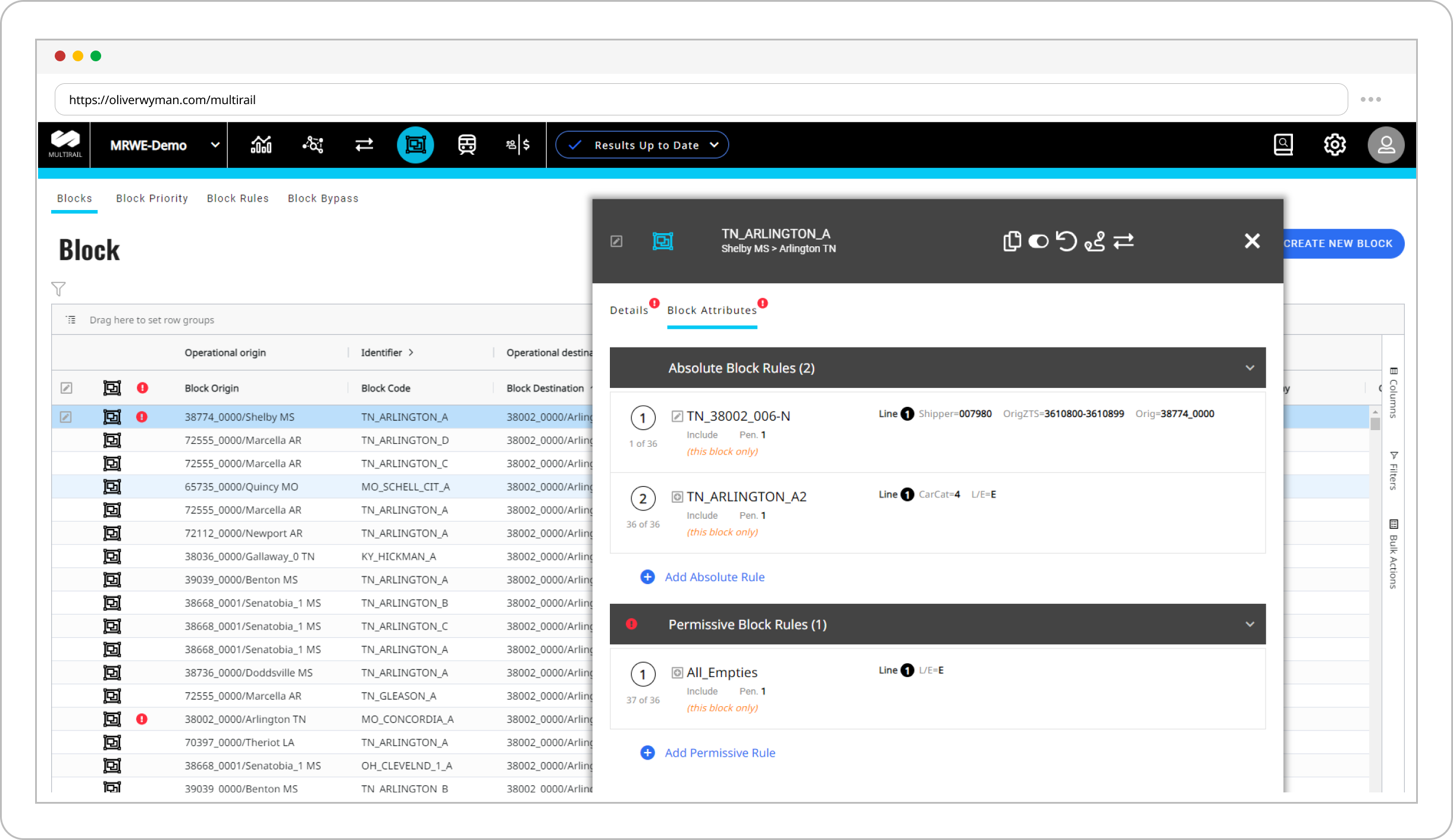
MultiRail Web can adapt to the blocking paradigm in use at a railroad today, as well as changes planned for the future. Its advanced blocking-plan management structure supports either algorithmic or table-based approaches. The interface also supports complex, multi-criteria traffic-blocking rules and a range of blocking attributes that can be customized for compatibility with advanced railroad scheduling systems.
For an algorithmic approach, MultiRail Web automatically selects blocks based on the optimal traffic path to the destination. Teams can fine-tune the algorithmic plan through permissive and absolute rules. Railroads that want to retain table-based blocking rules can continue to use that approach.
TRAIN PLANNING WITH INTEGRATED CAPACITY EVALUATION
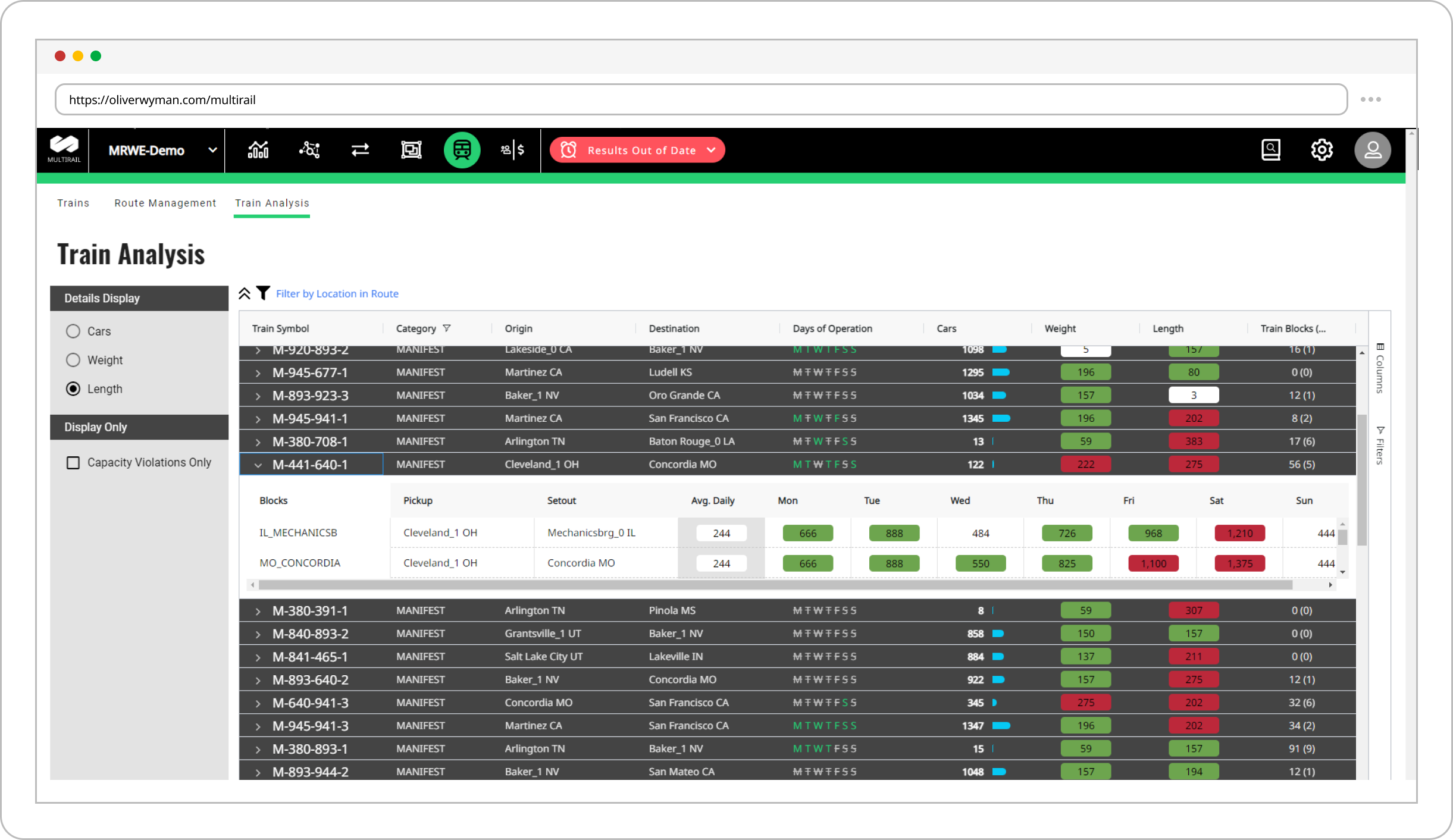
MultiRail Web’s interfaces regularly provide information about the capacity of critical railroad components, especially terminals and trains. Users do not need to seek capacity information in another system or report. The interface displays capacity validation and alerts directly within plan management.
Changing the makeup of a train, such as adding blocks or pickup events, immediately updates the estimated train size and alerts users if a capacity violation is expected. After changes to blocking plans or handling cutoff times, MultiRail Web re-simulates terminal handling activity and car inventory levels. It automatically validates the activity against terminal capacity to determine whether the plan is feasible.
INTEGRATED PLAN IMPROVEMENT AND OPTIMIZATION TOOLS
MultiRail Web integrates plan-improvement suggestion tools that provide simple, clear options for improving blocking or train plans. Data-driven selections can help reduce handlings, shorten terminal dwell, flatten peak station occupancy, and more.
Each suggested improvement is evaluated for its potential impact on key metrics and can be incorporated with minimal manual data manipulation. Re-simulation helps users check indirect or unintended impacts on other parts of the plan and quantify potential effects on the customer experience.
NETWORK DISPLAY TOOLS FOR PLANNER CONVENIENCE
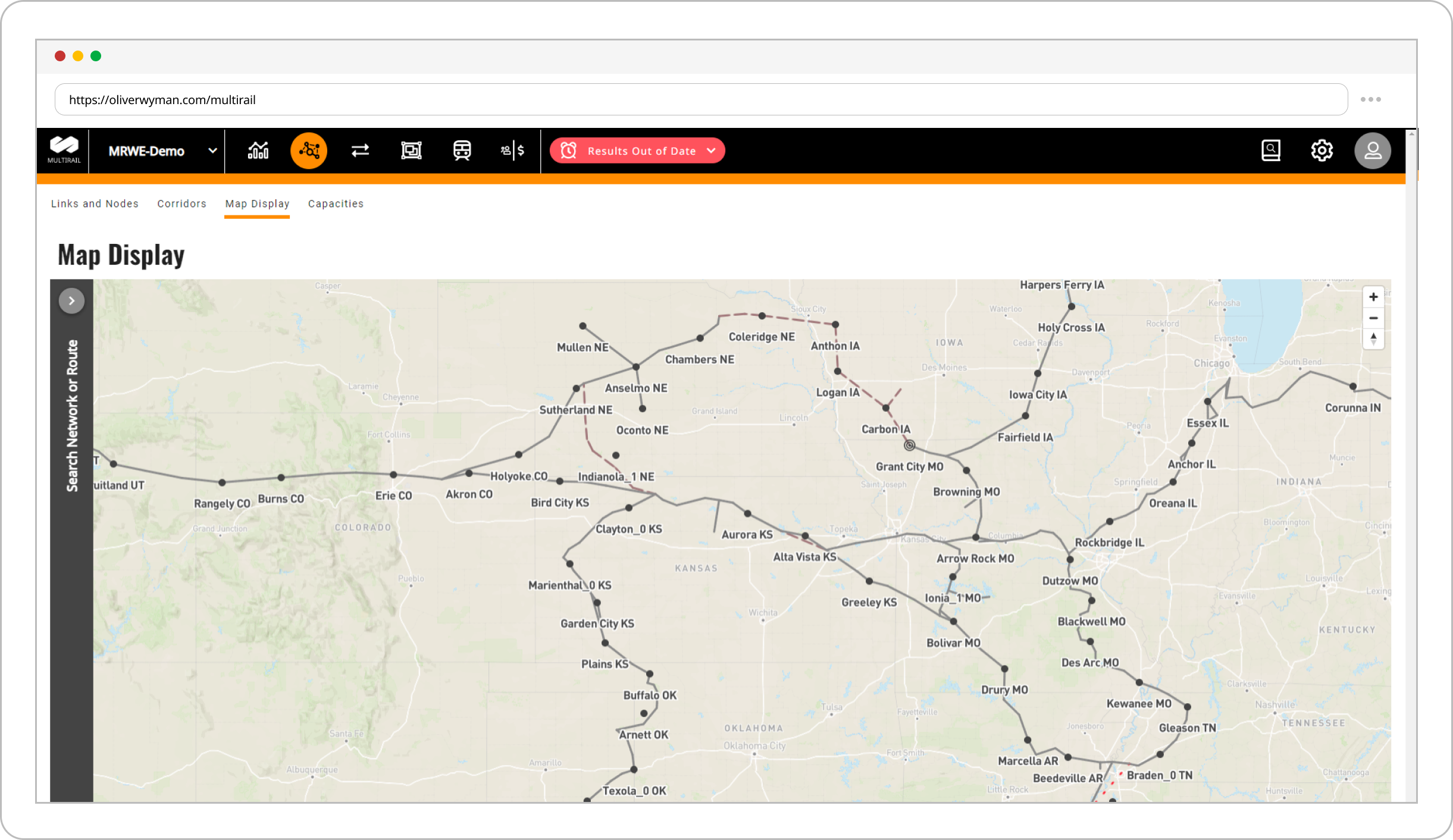
MultiRail Web uses modern mapping components to represent the railroad network. Its mapping engine allows the railroad network to be overlaid with road maps, public rail data, and geographic and urban features for a clear view of railroad structure and operations.
Users can visualize train routes and zoom in to understand terminal and corridor activity levels.
CONDENSED PLAN SIMULATION SUMMARIES FOR EVALUATING CHANGES
MultiRail Web focuses attention on efficient summaries and a clear presentation of key plan metrics. Dynamic dashboards replace legacy static reports and summarize plan-simulation results from terminal, corridor, and train perspectives. Rapid dashboard updates and integrated scenario comparisons reduce the time between making plan adjustments and evaluating their effects.
Users can compare a new plan with a baseline plan, compare two new plans, or compare a new plan with the plan used in the same quarter one year earlier. These flexible comparisons help teams present results to operations, marketing, and other stakeholders.

Want to know more?

Reach out with additional questions or to request a live demonstration or pricing details for MultiRail Web

Get in touch